Understanding SSL Certificates Detailed Breakdown
Table of Contents

What is an SSL Certificate? #
An SSL (Secure Sockets Layer) certificate is a digital certificate that authenticates the identity of a website and encrypts data exchanged between a client and a server. SSL certificates are used to establish a secure connection between a web browser and a web server, ensuring that sensitive information such as login credentials, personal data, and financial details are protected from eavesdroppers and hackers.
When a browser connects to a website, the SSL certificate is used to encrypt the data transmitted between the browser and the server. This encryption ensures that the data is secure and cannot be read by unauthorized parties. The SSL certificate also provides authentication, verifying that the website is legitimate and not an imposter trying to steal sensitive information.
Components of an SSL Certificate #
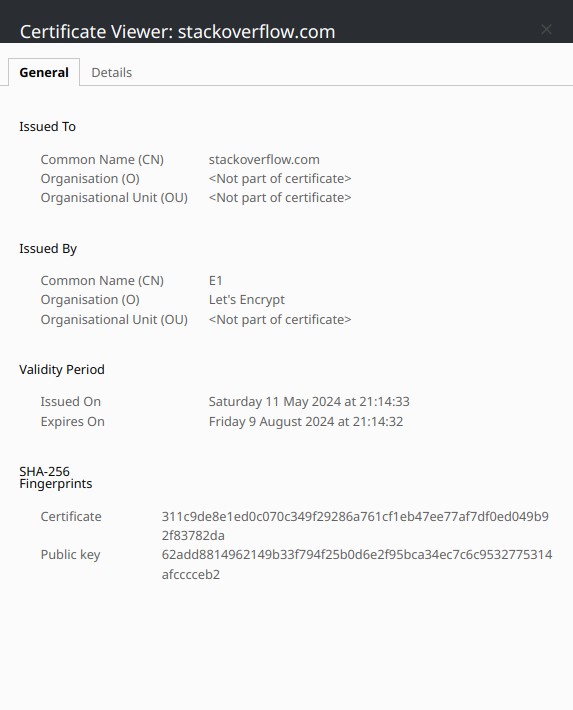
You can view the details of an SSL certificate by clicking on the padlock icon in the browser’s address bar and selecting “Certificate” or “View Certificate.” For example, the certificate used on the microsoft.com website contains show the following in the browser.
CN (Common Name) #
The Common Name (CN) is the primary domain name that the SSL certificate is issued for. It is the domain name that the certificate is valid for and is used to verify that the website is legitimate. For example, the CN for the certificate used on the microsoft.com website is *.microsoft.com, which means that the certificate is valid for all subdomains of microsoft.com. Not these are only one level deep, so *.example.com would not cover *.sub.example.com.
Issued By #
The Issued By field specifies the Certificate Authority (CA) that issued the SSL certificate. The CA is a trusted entity that verifies the identity of the website and issues the certificate. Browsers trust certificates issued by well-known CAs, such as DigiCert, Let’s Encrypt, and Comodo, and display a warning if the certificate is not issued by a trusted CA.
Validity Period #
The Validity Period indicates the period during which the SSL certificate is valid. SSL certificates have an expiration date, after which they are no longer considered valid. It is essential to renew the certificate before it expires to ensure that the website remains secure.
Fingerprints #
The fingerprints are unique identifiers that are used to verify the integrity of the SSL certificate. They are generated using cryptographic hash functions over the full certificate data and are used to detect any modifications or tampering with the certificate. The fingerprints are displayed as a series of hexadecimal characters, that are generated using cryptographic hash functions such as SHA-256 or SHA-1.
Public Key #
The Public Key is a cryptographic key that is used to encrypt data transmitted between the client and the server. It is part of the SSL certificate and is used to establish a secure connection between the browser and the server. The Public Key is used to encrypt the data, while the Private Key is used to decrypt it.
Serial Number #
The Serial Number is a unique identifier that is assigned to the SSL certificate by the Certificate Authority. It is used to track the certificate and verify its authenticity. The Serial Number is displayed as a series of hexadecimal characters and is unique for each certificate issued by the CA.
Subject Alternative Names (SANs) #
Subject Alternative Names (SANs) are additional domain names that the SSL certificate is valid for. SANs allow a single certificate to be used for multiple domain names, including subdomains and alternative domain names. For example, the CN may use *.example.com, and the SANs may include www.example.net, *.example.org, and blog.example.co.
Certificate Signature Algorithm #
The Signature Algorithm is the cryptographic algorithm used to sign the SSL certificate. It is used to verify the authenticity of the certificate and ensure that it has not been tampered with. The Signature Algorithm is displayed as a series of characters, such as SHA-256 with RSA encryption.
Certificate Signature Value #
The Signature is the digital signature that is used to verify the authenticity of the SSL certificate. The CA generates a hash of the certificate’s data and then encrypts this hash with its private key to create the digital signature. The Signature is unique for each certificate and is used to verify that the certificate is valid and has not been tampered with.
To verify the signature, a client uses the CA’s public key to decrypt the signature back into a hash value and compares this hash with a hash it generates from the certificate’s data. If they match, the certificate is considered authentic.
Extensions #
Extensions are additional fields that provide additional information about the SSL certificate. They can include details such as the certificate’s key usage, extended key usage, and certificate policies. Extensions are used to specify how the certificate can be used and provide additional security features. Common extensions include.
Key Usage #
The Key Usage extension specifies the cryptographic operations that the certificate can be used for. It defines whether the certificate can be used for encryption, decryption, digital signatures, or key agreement. The Key Usage extension is used to restrict the certificate’s usage to specific operations and enhance security.
Extended Key Usage #
The Extended Key Usage extension specifies the purposes for which the certificate can be used. It defines whether the certificate can be used for client authentication, server authentication, code signing, email protection, or time stamping. The Extended Key Usage extension is used to restrict the certificate’s usage to specific purposes and enhance security.
Basic Constraints #
The Basic Constraints extension specifies whether the certificate can be used as a Certificate Authority (CA) to issue other certificates. It defines whether the certificate can be used to sign other certificates and establish a chain of trust. The Basic Constraints extension is used to restrict the certificate’s usage and prevent unauthorized certificate issuance.
CRL Distribution Points #
The Certificate Revocation List (CRL) Distribution Points extension specifies the locations where the Certificate Revocation List is published. The CRL is a list of revoked certificates that have been invalidated before their expiration date. The CRL Distribution Points extension is used to provide information about where to find the CRL and check the validity of certificates.